Nunix

  • Augmenter la taille
  • Taille par défaut
  • Diminuer la taille
Nunix

Reveal hidden visitors on Viadeo.com

Envoyer Imprimer PDF

Viadeo has a feature to reveal who visited your profile.... but you first have to pay to become a premium user.

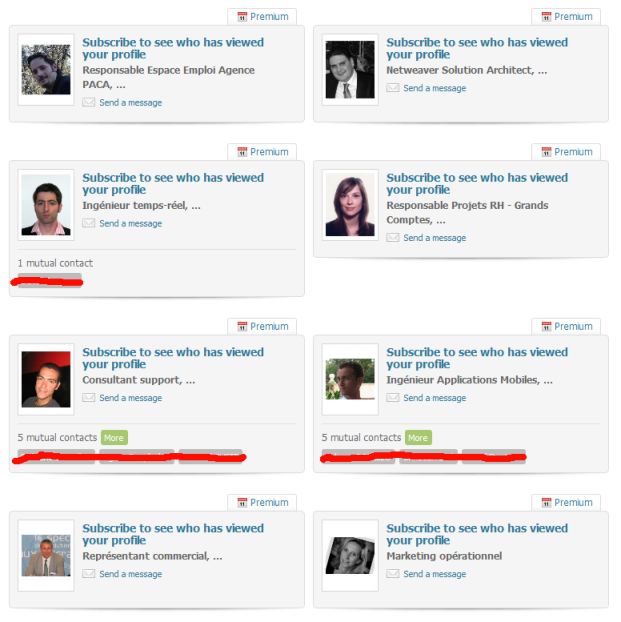
But the way viadeo presents us the different profiles "anonymized" (cf picture1) contains a token which identify a profile. To illustrate this tiny breach in their business, I've created a small script you can launch when browsing the viadeo "profile visits view".

Basically it replaces all links on profile cards by the user profile link whereas normally they point to the subscription page. The script also browses for you the different profiles and replace the labels by the real name and job position from your visitor (cf picture 2). Be careful that this latest option creates automated activity for your account and indicates to the profiles being revealed that you have visited them.


Before :

Anonymized profile card for your account's visitors on viadeo.com

After:
Attachments:
Download this file (1-subscribe.jpg)1-subscribe.jpg[Original view]53 Kb
Download this file (2-processing.jpg)2-processing.jpg[View during processing]45 Kb
Download this file (3-enjoy.jpg)3-enjoy.jpg[Visitors revealed]56 Kb
Download this file (viadeo_mini.js)viadeo_mini.js[Javascript to bookmark and execute on viadeo.com profile visits page]1 Kb

Mise à jour le Dimanche, 16 Janvier 2011 22:57
 

RAW_SOCKET to forge UDP packets

Envoyer Imprimer PDF

Recently, I had to forge UDP packets in order to resolve a challenge, but unfortunately, I faced a lack of documentation on RAW_SOCKET with the usage of UDP. So there is my feedback on how to forge correct UDP packets, with links to documentation I used.

To begin with, let me introduce what is a RAW_SOCKET, and what we can do with it. A RAW_SOCKET is a type of socket that allows you to bypass the operating system encapsulation. You are responsible to fill all headers of the different protocols used during the communication. Thus, you have to fill IP Header, and UDP header on our example. Furthermore, you have to comply with the different RFCs by computing yourself all checksums to keep packet's integrity while transmitting data in the wild.

A RAW_SOCKET requires root credentials, as forging a packet is really sensitive and allows one to do IP Spoofing on local network (ISP's protection are pretty efficient :)). You can also use them to do application spoofing in order to send application-specific data, or whatever you want.

Create the socket
Attachments:
Download this file (client.c)client.c[UDP Client with SOCK_DGRAM]0 Kb
Download this file (nunix.c)rawudp.c[UDP Client, with SOCK_RAW and custom IP and UDP hdr]5 Kb
Download this file (server.c)server.c[UDP Server, listenning on port 9930]0 Kb

Mise à jour le Mardi, 04 Janvier 2011 15:44
 

Chiffrer un fichier avec Openssl

Envoyer Imprimer PDF

C'est dans un élan de paranoïa aigüe que je me suis penché sur la question du cryptage de fichier.

Après quelques rapides recherches j'ai appris que l'on ne dit pas " crypter " mais " chiffrer" ( http://fr.wikipedia.org/wiki/Chiffrement ) et surtout on trouve une multitude soft qui peuvent résoudre notre problème.

EasyCrypt et encfs marche très bien, mais j'ai une petit préférence pour OpenSSL.

Le cryptage/décryptage ce fait en ligne de commande avec une syntaxe très simple. De plus c'est rapide et multiplateforme.
Une multitude de solutions sont possibles, une des plus simples est la suivante:

chiffrer un fichier:

openssl  aes-256-ecb -in ficher_a_crypter -out fichier_crypte 


déchiffrer un fichier:

openssl  aes-256-ecb -d -in fichier_crypte -out fichier_decrypte 


Les plus curieux d'entre vous peuvent se pencher sur le TP de l'Université Paris Descartes pour découvrir plus de fonctionnalité de OpenSSL. www.mi.parisdescartes.fr/~osalem/enseignement/SSIC/TPopenssl1.pdf

Et voila, amusez vous bien,....

Mise à jour le Mercredi, 13 Janvier 2010 19:25
 

How to use Jabref behind a proxy

Envoyer Imprimer PDF

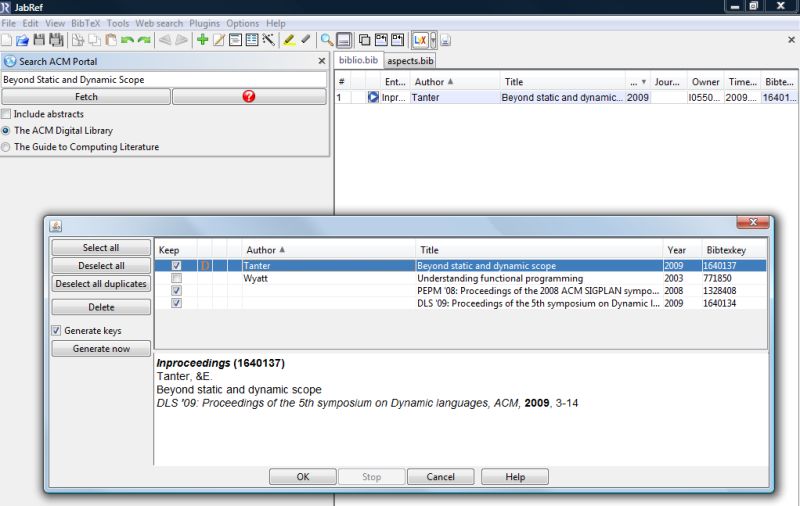
Jabref, a powerful tool to manage bibliography, has a special feature that let the user search bibtex entries online, and import them within your bibliography.

A problem occurs when you run JabRef behind a proxy (corporate or not), because no options is available to configure it.

Hopefully, JabRef is provided as a jar so we have the ability to modify proxy properties used by java.

Just run the following command :

 java -Dhttp.proxyHost="proxy" -Dhttp.proxyPort="8080" -jar "/where/is/the/jar/JabRef-2.6b2.jar"


 That's it, you can search for whatever you want on ACM portal, IEEE, etc. in few clicks. 

 For information,

  • java properties for proxy (https, ftp, sock, etc.) : http://java.sun.com/javase/6/docs/technotes/guides/net/proxies.html
  • Sorry for screenshot with vista skin, but as my corporate's laptop is using it, I need to work with it :D But this tip is cross platform.
Mise à jour le Mardi, 29 Décembre 2009 14:58
 

Setting up PluXML with Nginx

Envoyer Imprimer PDF

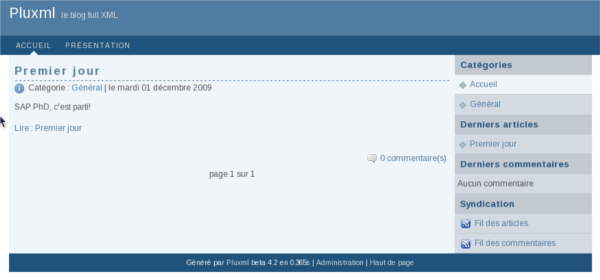
Hi, today, we are going to see powerfull web servers - nginx - and portable cms - PluXML written in Php.

 The goal is to set up the all solution under fedora 12 and make it works in local. 

 Let's start with most important steps and resources that allowed me to set up everything in quiet short time :

  • PluXML : Download the latest archive and extract it wherever you want on your drive
  • NGinx : Downlad and build-it up, or install it through your favorite package-manager (i.e yum install nginx)
  • Install Php and FastCGI in your system,for example under fedora : yum install lighttpd-fastcgi php php-gd
Mise à jour le Lundi, 07 Décembre 2009 23:00
 
  • «
  •  Début 
  •  Précédent 
  •  1 
  •  2 
  •  3 
  •  4 
  •  5 
  •  6 
  •  7 
  •  8 
  •  Suivant 
  •  Fin 
  • »


Page 1 sur 8

Login


Visiteurs

Total: 128